Thursday, 19 May 2022

Team-based Quizzes - Moving Scratch-Its Cards Online

The idea of collaborative learning has been around in higher education for a while. For example, Professor Eric Mazur highlighted peer instruction in his famous paper where students worked individually and then in teams to complete weekly quizzes. The quizzes were set up so that students could receive immediate feedback and try multiple times. It was believed to improve student discussion and learning.

Before the pandemic started, collaborative learning activities such as team-based quizzes were quite popular across Buseco. For example, teachers were able to prepare and order scratch-it cards using the immediate feedback assessment technique to host team-based quizzes for their tutorials or workshops as shown below.


However, the sudden change to online teaching brought challenges to continuing such team-based quizzes learning activities. Since tools such as Learning Catalytics are too expensive to use and other free workarounds such as Qualtrics are too difficult to set up (amazing how Dr Amanda White found a Qualtrics workaround), Buseco teachers have to be innovative to make it happen in our online classes.

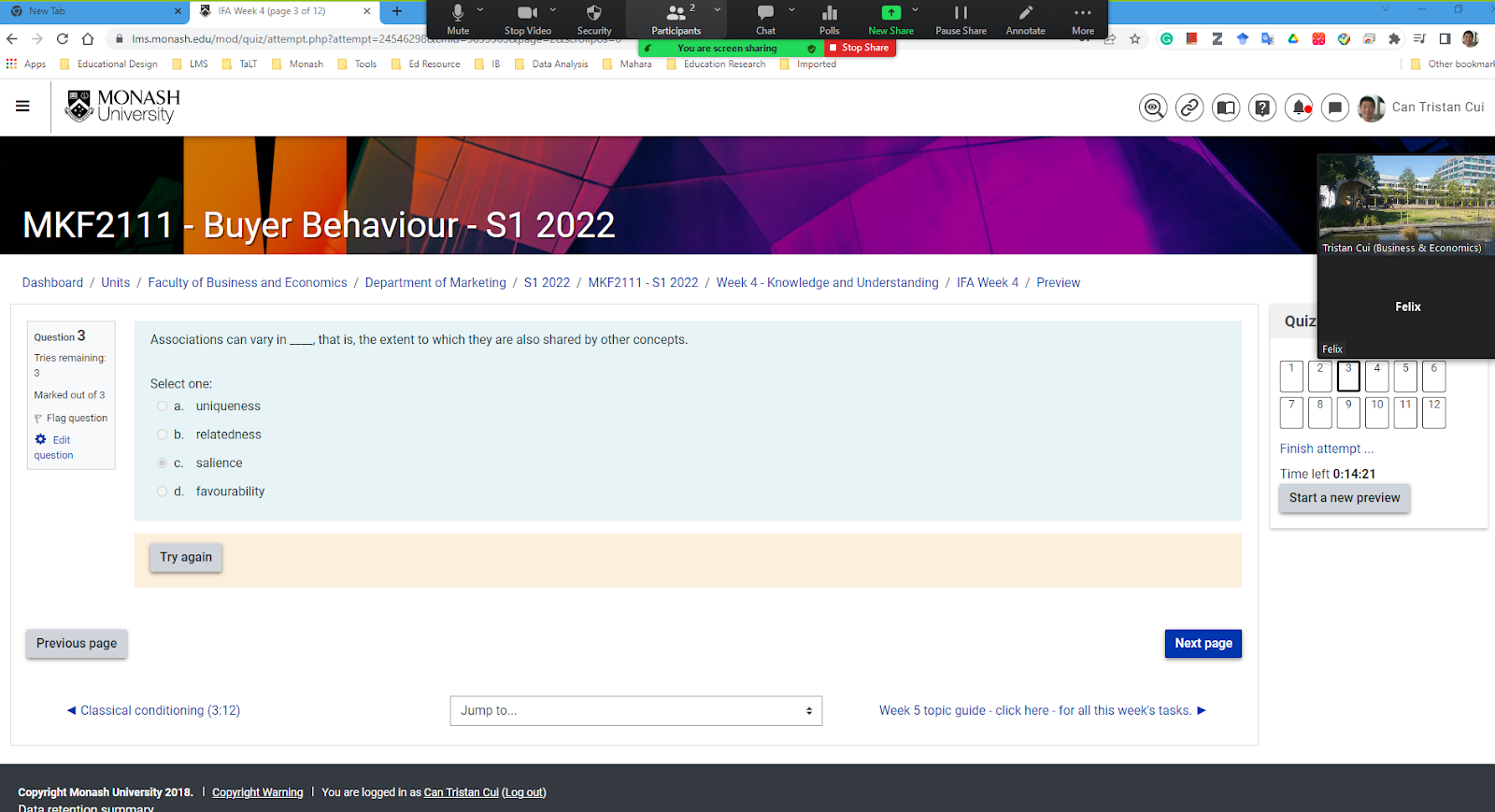
And they succeeded. Angela Cruz and Peter (Wags) Wagstaff from Marketing (MKF1120) first found out how Moodle quiz could facilitate team-based quizzes in Zoom breakout rooms. With a little configuration, students can get feedback immediately (whether the answer was right or wrong) in Moodle MCQ Quiz. And then they can have another attempt, but with progressively reducing marks. A group of students work on the quizzes together in the Zoom breakout rooms, while the team leader, who has the password to the quiz, shares the screen with the team. So if they happen to select the wrong answer, they know it immediately and have a chance to discuss and answer the question again. Angela Cruz and Peter (Wags) Wagstaff successfully tried that last year and shared the experience with other teachers in Marketing. In S1 2022, Gerri Spassova implemented the team-based Moodle quizzes in her online cohort while providing scratch-it cards to her face-to-face cohorts in her Buyer Behaviour unit. As a result, the online students could engage in the peer learning activities in Zoom and have a similar learning experience as the face-to-face students. Thanks to Gerri Spassova, I observed one of the online tutorials. In the Zoom breakout rooms, the team leader opened the quiz with a password and shared their screen with others. The students who attended were required to submit their IDs first. And then the students work together on the MCQ questions.


I have noticed the students' interaction in the breakout rooms. For every question, they discussed before submitting the answer. Then, after the immediate feedback, they could reflect and further discuss the question and submit the answer again until they got it right. Or if they were not 100% sure about the choice, they would be excited if they got it right and immediately reflect on their discussions. And one interesting observation is that the two teams that I observed, they got almost all the questions right, which is different from what I saw in other units' scratch-it questions in face-to-face workshops. This might be because the team leaders, who volunteered to access the online quiz and shared the screen, could possibly also be high achieving students who could guide the discussions to the correct answers. The practice seems effective in engaging online students in peer instruction.
Here are the testimonies from Buseco teachers:

We were keen to maximise team-based activities in tutorials, whilst maintaining an incentive for students to complete the pre-class reading and lesson. The traditional scratch cards achieved both of these outcomes, so it was critical that we found an online equivalent. Who would have thought that Moodle quizzes could be so collaborative!

– Peter (Wags) Wagstaff


Having the online equivalent of the Scratch-it cards was great for several reasons. It allowed us to maintain consistency between the on-campus and online modes of quiz testing. It is also such a fun activity for the students - it takes away the stress of doing individual online quizzes and allows students to socialise. I do believe that it also promotes deeper learning by encouraging students to discuss the answers together.

– Gerri Spassova

You can create such MCQ questions in Moodle. After setting the MCQ question's default mark to 3, you can follow the screenshot below to allow multiple tries and give a penalty for each incorrect try:

If you want to give it a try but need some help or have any questions, please contact us.

Monday, 4 April 2022

Informal feedback for teaching

If it takes you more than ten seconds to recall how many semesters you have taught at Monash, you probably are an experienced educator in higher education. Teaching has become second nature, and almost routined.

But you may also agree that no two student cohorts are the same, and you may face unique variables and teaching challenges every semester. And yet there is not always a standard approach to understanding how our diverse cohorts of students feel about different aspects of instructions and pedagogy. 

That's why it's important to talk about informal feedback for teaching.

Student feedback can be collected in the form of polls, suggestion boxed, questionnaires, informal discussion or conversations, focus groups, facilitated discussions, among many others (Harvey, 2003). Informal feedback may look at any aspects of teaching effectiveness as well as students' learning. Furthermore, whereby more summative evaluation of teaching focuses on the ratings and take places at the end of the semester, informal feedback focuses on teaching/ learning progress and can be used to inform the developmental purposes of the unit. 

Singh and Jha's 2014 study has found that there can be discrepancy between educator's own rating of their teaching effectiveness and students' rating. The authors recommended that informal feedback directly from students collected during the semester can be a reliable, "non-threatening and mutually beneficial" source of information to help educators enhance their teaching practice. 

If you would like to know more about informal feedback on teaching, here is the recording of a session I facilitated on this topic. You may find this guide to setting a Feedback activity in Moodle or using FLUX to collect student input helpful. 

While there is a large body of literature on the why and how of student feedback for teaching, there is much less spotlight on how educators receive and process student feedback, as well as the impact such feedback may have on educators. Here is Dr Amanda White walking us through how she unpacks feedback from students, and how to make it a constructive process: 

Having a 'growth mindset', as illustrated in the video below, can also support you and students in having a more positive relationship with giving and receiving feedback:


Giving students an opportunity to provide informal feedback does not only address a communication gap between students and educators, but also helps build rapport and increase students' trust in the educator's effort in creating the optimal learning experience (Singh and Jha, 2014). It's never too late to ask "what if...?", to check-in with students and understand how teaching and learning can be better. 

Wednesday, 23 February 2022

Improving Self: Google Tools for Communication & Time Management

With an increasing portion of educational work being devoted to more administrative tasks, it can be a challenge to keep up with so many moving parts.

Google has actually been doing something helpful and useful of late - and that's rolling new features in the tools on offer, which is a good thing that Monash Uni is a Google-shop!

Although I know some integrate their email and calendar with Microsoft's Outlook - so, unfortunately, the following may not be as relevant to you. But perhaps it might convince you to jump ship to 'taste the rainbow' - specifically, the Google Rainbow, through the web-based services.

GoogleMail (GMail)

Schedule Send

This one has actually been around for a little while, but some may not know it's there (or have forgotten). When composing a new email, just before clicking [Send], you can click the little upward arrow (carat) and then reveal another option: Schedule Send.


When you click this, you can choose from a handful of 'default' days and times to schedule the email to be sent 


OR, you can opt to choose a specific day and time.

Why is this useful / helpful

By using the schedule, you can make it look like you responded to emails on a Monday morning or afternoon, instead of midnight on a Saturday. 

Managing expectations is important, including setting boundaries on when we read and respond to emails. We understand some people are night owls, or spend time working outside of business hours. This can be problematic when emails are responded to at 10 or 11 o'clock at night - especially on weekends. This can create a false expectation for the students that they can email you as they're frantically working on an assignment - assuming you will respond.

We often suggest trying to curtail these kinds of communication expectations - by specifying that responses for unit-based emails will occur on a particular day of the week; or by using the forums to offload some of the support to TAs and other students.

In my own signature, I have it stated that

This is a Calm Inbox: email is checked once in the AM and once in the PM. 

The reason behind this is so that people know when they are likely to get a response from me. On occasion, I will respond during the day (particularly if something comes through that is urgent) - but I try not to make a habit of this.

Whatever strategy you decide to employ - be sure to stick with it!

Google Calendar

Google Calendar has seen quite a few updates in the past year, mostly to support online / hybrid meetings, along with some lesser known settings. Here are a few that you might find useful in your own workflow.

1. Different Categories

Many of us have at some point or another 'blocked out' time in our calendars to work on tasks and avoid back-to-back-to-back meetings; which can be very exhausting (and not always productive). However, now you can specify the type of 'appointment' (or task) in your calendar.


Event - The stock, standard calendar 'block', which allows you to invite people, book rooms, add a zoom meeting, etc.

Focus Time - Blocks out time, which reminds you to do something, and automatically declines meetings you are invited to after setting this Focus Time block.

Out of Office - Allows you to specify a time period where you are unavailable, and thus automatically declines meetings you are invited to after setting this Out of Office block.

Task - This allows you to specify a 'to do' activity, which will actually appear in a task-list (viewable as an additional pane in Google Mail).

Appointment Slots - This is how you can set up 'office hours' with students - specifying times, days, and locations in a simple self-enroll calendar appointment.

Why is this useful / helpful

With some of these, the calendar can be set to automatically decline any events that you are invited to during that blocked out slot. It is also a way to create a task - which links to your 'To Do' list - and which allows you to keep track of on-going projects or tasks.

2. Meeting Notes


How often have you started a meeting - particularly in Zoom - and then decided "oh, maybe we should be taking down some notes?". Then you would open up Word, or Google Docs, create a new document and start writing away.

But then, at the end of the meeting, you need to share that document - either by emailing the offline document through, or sharing the Google Doc - if you remember.

Now you can just create 'Meeting Notes' that are attached to the event itself, and will be shared to all meeting attendees. This allows for easy collaboration on the document itself, as well as ensuring that nothing gets forgotten.

Why is this useful / helpful

Everyone cant get access to the notes straight away - and can follow up on any action items, or refer back to discussions or ideas without needing to wait for the 'master' document to be circulated, uploaded to a group / shared folder, or shared specifically with all the appropriate individuals.

3. Time Insights


You can now get some analytics on how you're spending your time - at least, based on your usage of Google calendar. This is where scheduling the focus time can be helpful, alongside setting 'working hours' (we recognise this is less clear for educators); as it can identify gaps, how much time is spent on 'focused works', and also see the number of meetings you have - along with participant numbers of those meetings.

Why is this useful / helpful

This can be really helpful to keep track of where time is going, along with seeing what percentage of your week is in meeting vs focused time. You can even go back to past weeks and see how your time was being spent, with an average of meeting time being calculated by the current week + previous 2 weeks (total of 3 week running average). 

Switching between views (week / month / year) will give you a breakdown of that time frame.

4. Attending Meetings in person / Virtually

As we slowly start to return back to campus, and in-person meetings or catchups - sometimes there can be confusion on how people plan to attend. Many are still thinking that 'Zoom' is the de-facto method of meeting. Others might assume that we're all back on campus. You also can't infer the lack of Zoom information in a calendar invitation to mean it is in person (after all, I'm fairly certain that we have all forgotten to attach Zoom details at one time or another).

You'll notice now that when you get a meeting invite, that the 'Yes' button has a little arrow on it. If you click this, you can specify your mode of attendance: 

In the above example, you can see that the [Yes] button already has a camera next to it. By default, a virtual meeting (one that has a Zoom link attached) will be a virtual one by default.
 

Why is this useful / helpful

It can be tricky to ensure everyone is in the same location at the same time. With many tipping that hybrid work is the new normal, along with the potential that some may need to isolate due to exposure to Covid or other sickness, it's important to allow participants to forewarn how they intend to join the meeting. This also means being able to find a space more suited to the number of people attending in person.

5. Speedy Meetings

Google Calendar has a setting (next to the myriad of other settings) that allows you to change the default duration of any block you add into your Google calendar.

Above: The default meeting setting 
 

Above: Speedy Meetings; Long meetings (50 mins, or more) finish 10 minutes earlier,
whilst short ones finish 5 minutes earlier. 
 
You can even change the 'default' length for a meeting when you create an event in your Google Calendar.
 

Why is this useful / helpful

I've had this as a default setting for a few years now - and have had quite a few people comment on "how nice it is to finish meetings a little earlier". As it gives them time to grab a coffee or tea, go to the toilet - or just have a bit of a mental reprieve, particularly if they're jumping between meetings.

Likewise, it provides an opportunity for you, as the Meeting Host, to take down notes, or quickly process any follow up tasks related to that meeting, before going on to another activity.

6. Set Working Times + Locations

It's no secret (and a talked-to-death point) that nCov19 (Covid19) has changed our working patterns and behaviors. It's important to be clear about where we are to our colleagues so that they can anticipate and plan accordingly. Even before Covid, many academics have been balancing some Work From Home with on-site attendance for meetings and teaching. 

Whilst one might have - in the past - set an 'all day event' specifying their location, you can now make it clearer in Google Calendar, so that colleagues (and students - if you give them view permission) can see which campus or location you will be working from.

Further, and possibly more importantly, you can specify working hours too, with the ability to automatically decline events you are invited to / included in that fall outside specific hours

 
There are generic 'home' and 'office' labels; or, if you want to be more specific - particularly if you work between campuses; specify the location:


Why is this useful / helpful

This helps colleagues - or students - to know where you may be on certain days of the week, and at certain times. Combined with the appointment times, it will also allow students to see that your appointments will be at certain campuses - so as to avoid mix-ups or confusion.

It can also help with being more aware of time and over commitment - that may support a better work/life balance. We recognise that in some contexts, this is one of the very difficult and near-impossible things. But it is something to strive towards, to support your health and well tbeing, and those around you.


All of these combined can assist in creating a better work/life balance, as well as making expectations clear to colleagues and students alike. It can also help you to identify where time is going - and to try develop new strategies with regards to work flow.


Tuesday, 8 February 2022

Authentic Assessment Ideas: Infographics

Effective communication of information in a visual form is around us in our daily life. However, infographics (information graphics) as assessment still seems to be an emerging application in our teaching and learning strategies. Infographics are one-page documents that present a concise overview of a complex topic in visually rich form using icons, images, graphics and data (Darcy, 2019). As one of the few media forms that transfer complex information easily in an eye-catching way, the infographic is used widely in our society, including the commercial sector. It supports cognitive processing, learning, and future recognition and recollection (Dunlap and Lowenthal, 2016), and can reduce understanding barriers due to the human brain's rapid visual processing (Otten et al., 2015). 

Accordingly, scholars suggest that graduates need to be able to interpret as well as create infographics in work environments (Toth, 2013). A well-designed infographic learning activity and assessment can encourage critical thinking and teach students to apply knowledge in an innovative and communicable form while also demonstrating digital literacy (Darcy, 2019; Dunlap and Lowenthal, 2016). But there are risks as well if the data or information is used inappropriately. Being a visually appealing medium, an infographic can influence its viewers more powerfully and induce greater trust in its information (Toth, 2013). As such, it is vital for teachers to guide students in creating infographics ethically. One suggestion is to use it in a group activity so that multiple members' input could reduce the possibility of inaccurately presented data (Otten et al., 2015). 

Educators in the Monash Business School have also started to apply infographics as new assessment forms. They have noticed that such assessments not only assess subject-related learning outcomes but also develop students' employability by imparting transferable skills. Associate Professor Srinivas Sridharan has designed and implemented a collaborative infographic assessment in his unit MKC3140 - Marketing strategy implementation since 2020. In the latest semester, students worked in teams for three weeks to research a real-world case and create an infographic to visually present their work. This authentic assessment simulated a scenario of students working in a marketing consultancy team with an Australian grocery retailer client. The student team would read supplied materials, discuss, research, compile their ideas, write, and create the infographic. Such innovative assessment design does not only assess the marketing-related higher-order learning outcomes, but it also provides a unique opportunity for students to practise their digital literacy and Monash Graduate Attributes in terms of critical thinking, creativity and communication.


Figure 1 Part of the Infographic Assessment Instruction


Considering that students might not be familiar with this type of assessment, Srinivas has prepared a detailed assignment instruction with visually presented information and a marking rubric for the students. The assessment was also introduced and discussed in the tutorials. He provided students with quite some flexibility in terms of the infographic format and that is a great practice to design assessments for academic integrity. The rubric assesses both content and visual storytelling. With such preparations, students were able to produce some really interesting infographics.


The students' feedback is very positive. They considered the assessment effective and help them to apply the knowledge. More importantly, the innovative assessment provides them with a unique opportunity to challenge their way of thinking that is built by the traditional marketing assignment. By engaging students in such innovative assessments, we hope that the students learn to critically engage with information, develop essential lifelong learning skills, and get ready for the evolving future.


And in future teaching, we can also look at how the business industry creates and uses infographics. A lot of those infographics (e.g. Infographic - Bringing the farm to school) are very visual and contain less text compared to the student assignments. Education design work can improve the assessment activity and make it more authentic.


Words from the CE: Associate Professor Srinivas Sridharan 


In today’s fast-paced workplaces, managers want their teams to produce short and sharp documents that convey the essence of a complex issue and yet look comprehensive in their coverage. In particular, the infographic has emerged as a powerful presentation tool. It is also a powerful marketing tool for firms. Marketing emails and blogs whose content contains infographics are shown to generate more links back to a firm’s website than content without infographics (sometimes 90-100% more). Thus, for business students, building infographics can confer hands-on experience in developing a critical digital design type of skill while simultaneously assessing for the core subject matter. And they are more engaged too!


What is your experience?

What have you experienced in trying new ideas of assessments such as infographics? What worked and what did not? Please leave a reply or share your story with us.

Friday, 10 December 2021

Enhancing teaching team's communication at Econometrics and Business Statistics

I had the pleasure of being a part of the department of Econometrics and Business Statistics (EBS)'s retreat earlier this month in the beautiful Red Hill. It was the first one after almost two years of uncertainty and radical changes due to the pandemic, and it was fantastic to see colleagues excitedly catching up and bonding over shared experiences. In the spirit of wrapping up and reflecting on 2021, I facilitated a session titled "Enhancing communication within teaching teams" which saw EBS colleagues engage in buzzing discussions and share great ideas. 

To offer some contexts for the session, let's turn back time to the beginning of 2021. Charanjit Kaur and I have been working on developing an Education Training Pathway that focuses on long-term and structured teaching development for tutors at EBS. 

EBS's Education Training Pathway

In undertaking this project, we conducted a series of discussions with tutors to better understand their needs for teaching development, and found that the theme of communication within teaching teams kept surfacing. As a result, we sent out a survey from the department's tutors to gather more feedback and suggestions for their team's communication. Below are some of the most commonly proposed ideas from survey responses:
  1. More regular updates and meetings among teaching team members
  2. Information related to weekly teaching to be communicated clearly and far in advance to tutors
  3. Collect and discuss feedback for the unit from teaching team and students
  4. Expectations, plans and changes to be communicated to head tutor in advance
  5. Utilise online communication platforms (Slack, Whatsapp, MS Teams, Moodle forums)
  6. More opportunities for team learning to share experience and exchange ideas
We also had the chance to hear from Ari Handayani and Julie Cook, two very seasoned Head Tutors in the department, about how they communicate with Chief Examiners and other tutors in their teams. 

Ari Handayani sharing her team's approaches to communication
Ari Handayani, an experienced Head Tutor, sharing her team's approaches to communication

And finally, colleagues in the room and those attending online had some time to join a group to discuss what had been presented, as well as to reflect on what they can take away. It was a pleasure to see many lively conversations, many ideas exchanged, and much food for thought. And I hope that the session served as a reminder for everyone to slow down, look back and think forward about how 2022 can be another year of improvements and innovations.

Thursday, 23 September 2021

Tool Tips: Hidden feature of Moodle marking guide

Feedback is integral to student learning and development, yet it is among the most neglected when it comes to assessment marking. And this could be due to reasons such as large number of submissions,  laborious processes of marking, or it simply gets old by the 100th essay! 

If this resonates with you, here is a great feature of the Moodle marking guide that can help you save time while providing meaningful feedback to students. The frequently used comments. 

While setting up your marking guide for assignments in Moodle, you can also create a bank of frequently used comments. These comments serve as templates that can be easily inserted into the feedback comment fields and edited during marking. This can save you from repeatedly typing similar feedback for hundreds of students, keep marking contained in Moodle, and provide all students an equal level of details in their feedback. 

Here is a video demonstration for implementing this in Moodle. 


Give this a go for your next assignment, and don't hesitate to reach out to your Ed designer for support. 

Thursday, 2 September 2021

Improving Moodle: Strategies with Links & Resources

This is a new series, dedicated to how educators can improve their Moodle sites.

When it comes to getting student's to click on things (sometimes referred to as 'engagement') it can often be a hard sell. The structure and the layout of a Moodle site plays a factor, but more importantly is how that link is being sold to the student.

Checkout the below video from the NNGroup (Nielsen-Norman, user experience specialists) to find out some principles to consider when linking to content.


[source]

Growing Social Presence in Online Courses

by Andrew Moshirnia, Department of Business Law and Taxation


The need to establish rapport in a classroom is paramount. The class-as-unit is a social organism, to be tended and maintained, with the goal that instruction may be enriched with responsive learners and innovative peers. But in this environment, how can we cultivate social presence without the benefit of physical presence? We already use discussion fora and other technologies to create opportunities for interaction, but here are five additional ways to grow social presence and hopefully make your units less anonymous and your Zoom calls less barren.
 
1. Stressing (and re-stressing) the Importance of Turning on Webcams (and addressing the legitimate concerns of students who do not wish to do so)
The number one concern that I field is that students are refusing to turn on their webcams. I take this head on, by devoting time in my first class to walk through four different motivations for turning on webcams: Etiquette, Business Skill, Student Satisfaction, and Personal Appeal. I also do a quick training on how to turn on a virtual background. I return to this topic frequently, usually at the start of every class, and results have been good. I also tailor webcam policy to increase the comfort of students who are willing to turn on webcams when speaking, but often are reluctant to leave cameras on throughout the lesson.


2. Pre-class Inventory
You can begin building a social connection before the unit starts (or alternatively in the very first week of the unit) by using a pre-class interest inventory. By email or the unit Moodle, you can query students in ways to create meaningful connections. Below is one that I use:

  • How does this unit fit in with your course of study? (If you are coming from a technical field that taught you system analysis as part of system or product design, please let me know here).
  • What is the best thing you remember learning about last year?
  • How do you learn best? What have teachers and professors done in the past that helped you to learn?
  • If you are reluctant to turn on your webcam during class, what adjustments can I make to encourage you to turn it on?
  • Please tell me anything else you think I should know about you (for example, preferred pronoun or title, specific learning need, area you want to improve, etc.)  
3. Creating Quasi-interactive Lectures
As many instructors are using pre-recorded lectures, it is important to sprinkle quasi-interactive moments in those recordings. Recording short welcome- and exit-videos provides this opportunity. In my welcome videos, I respond to student queries (creating a sort of call-in show vibe) and share a little story or fact that is on my mind (for example, wishing my students a happy Nowruz). Exit-videos are also helpful in summarising the lesson and setting up interest in the coming lesson.

4. Check-in / Mid-SETU
We have no doubt encountered SETU comments at the end of the year that we lament: “You should have told me that during the semester!” Thankfully, there is a easy cure: we do not need to wait for official SETU’s to ask SETU-type questions. I do a mid-sem SETU and make adjustments accordingly. Students are often delighted that a stray comment from them motivates a change.

5. Ice-breaker / Sponge Activities
During synchronous activities, It can be helpful to prime students to respond and also to give them a motivation to be on-time. I often ask students a random question for mass response in text: what’s your favourite dessert, type in your favourite movie quote, etc. This recruits attention and also creates a learning moment for how to use communication tools.

Monday, 19 July 2021

A New Journey: Hybrid Concurrent Teaching

Since S1 2021, a relatively new teaching mode has been introduced in Monashto to cope with the new scenario of the pandemic. In those classes, some students attend a workshop in a physical classroom while others attend via video conferencing (eg Zoom) at the same time. Teachers have to deliver synchronous learning occurring at the same time for both on-campus and remote participants, known as Hybrid Concurrent Teaching.

In this new model, every student is able to have the same opportunity to receive identical information from their teachers in real-time, discuss with their peers and teachers, and complete in-class learning activities synchronously.

This new mode allows all students to connect with their educators and peers at the same time. With the hybrid model, every student is able to get the same information presented by the educator at the same time. Students are all given the same opportunity to participate in class discussions and to participate in online-class activities synchronously. 

Despite its benefits, it also presents some new challenges to our teachers who most likely have never done that before. I know that I have never done that before! What should we do? MEA has prepared some interactive teaching scenario demonstrations on their website. And I am also preparing myself for working with such a unit in the coming semester.


Design and preparation

Other than the general principles for designing an engaging unit, some special considerations can be given to the following items:
  • Prepare a detailed session plan. Here are some examples from MEA:
  • Design how students in each cohort will ask questions and how both the question and answer will be communicated with other students if necessary.
  • Plan simple learning activities before advancing to the complex ones
  • Consider pre-recording most of the contents for students to view before the face-to-face sessions.
  • Plan extra time for:
    • Technical preparation
    • Time to socialise: ice-breaker, fun activities ...
    • Multiple mini-breaks


Teaching activities in the classroom

After attending MEA's hybrid teaching technical training session in the classroom that has a presenter camera with Zoom enabled, I have a better understanding of the technical requirements of the class (e.g. it is very important for all students to bring their own laptops and headsets) and which teaching activities might be suitable for the scenario.
  • Easy ones:
    • Demonstration
    • Polling
    • Quizzes
    • Presentations
  • Not so easy ones:
    • Group discussion
    • Collaborative whiteboard activities
    • Students to create resources
    • Group projects
MEA has prepared some questions to consider when you design those learning activities.


To mix or not to mix?

But the ultimate question for hybrid concurrent teaching might be: whether I should mix the on-site and online students in groups? Well, I have asked the same question to myself. 

Of course, you want to provide an equal learning experience for online and face-to-face students. In addition to asking everyone to join Zoom with the camera on and a headset, you want to mix them in groups in group activities. However, MEA strongly suggests we not do that. They even write that in BOLD in their guide. That is to avoid technical issues such as audio feedback.

I have not done such a test with everyone joining Zoom with a headset in one room. I guess things can get messy in a classroom with students' laptops, your mic, and the classroom speakers. Maybe it is better not to try mixing the face-to-face and online students and follow the MEA guide.


What is your experience?

What have you experienced in your hybrid concurrent teaching? What worked and what did not? What you are going to change in your teaching? Please leave a reply or share your story with us.

Tuesday, 29 June 2021

Example of excellence - Role-play in Accounting

In 2019, I had the pleasure of observing a very engaging and authentic form of assessment in Damien Lambert's class: role play based on storyboards of auditing scenarios that students have created. 

In this assignment, students are to demonstrate their understanding of the processes and activities involved in the planning, performance and conclusion of a financial report audit through the creation of a hypothetical scenario. The assignment also aimed to help students develop key skills and attributes of a effective auditor, according to a survey by Forbes and KPMG (2015):

This assessment format has been implemented in many Auditing and Assurance units, not only at Monash campuses but also in a graduate audit unit at San Francisco State University. With its four-year history and counting, this assessment has become a remarkable tradition. 

This year, I caught up with Damien, Ashna Prasad and Lisa Powell to learn more about how they have managed to successfully facilitate role play when students are not physically in the room. The answer is, unsurprisingly, technology. More specifically, empowering students to showcase their creativity through the use of technology. 

Which aspects of assessment design have stayed the same? 

  • Students are in groups of 4-5 members
  • Provision of written instructions
  • Detailed marking guide for storyboard (group) and role play (individual and group evaluation)
  • Group activities to help students connect with group members and build rapport
  • Role-play/presentation tips videos created in collaboration with Monash Centre of Theatre and Performance
  • Visual illustrations and visual performance art workshop run by a professional artist

What's new?

  • Hybrid cohort: some groups met face-to-face, and some worked completely online
  • Format of the role play performance: video submission, instead of live performance
  • Instructional videos for the assessments and other resources
  • Sample storyboard to demonstrate exemplars
  • Feedback Fruits used to facilitate peer evaluation
  • Students experienced less stress and anxiety of role-playing live, while showing more creativity through the creative process of making videos. 

Show time!

Here are some highlights from student performances. Enjoy!


These snippets of student role play are a testament to the power of students' creativity when they are given the space, guidance and autonomy to express it. The team and other colleagues have also written a paper about their teaching practice, and highlighted "enhanced creativity and human skills", as well as "high levels of engagement, motivation, and enthusiasm" among students. 

"Creativity in intelligence having fun." 

Albert Einstein

It goes without saying that contextualised and creative forms of assessment bring about challenges in terms of time, resources and student reception. Upon reflection, the team shared about a small minority of students who struggled with the lack of structure and ambiguity from the revised assessment format (Powell et al., 2015). Improvements such as more visual aids, video demonstrations and scaffolding towards dealing with ambiguous situations and uncertainties are in store for future student cohorts. 

How have you innovated to transform your teaching for a hybrid or online environment? We'd love to hear about your experience in the comments below. 

Friday, 22 January 2021

2021, A Year in Sight

Following on from the post at the end of last year, here is a reflection on things that academics had success with during 2020 and will continue to work with in 2021 or something they'd like to explore.


How TaLT Provided Support


Without tooting our own horn too much - it was important during these 'interviews' to find out how we, as TaLT, could improve our support to academics. During this process, there was much gratitude and affirmation. We felt it was important to share so that you may be inspired to consider the different ways the Faculty Educational Designers can work with you.

Every academic that was asked stated they felt "very well supported" by their departments Educational Designer (ED), along with all the TaLT resources.

And although some stated they felt guilty reaching out to the ED - because they thought they were doing so 'too often' - they knew they were welcome to do so, given that the convenience of a quick Zoom meeting was within reach.
These Zoom meetings often went beyond just the immediate problem at hand - but deeper conversations around assessment strategies and pedagogical approaches for different elements of the unit.

2020 required a complete rethink on approaches to teaching and learning; and so the ED would often provide suggestions on new things to try - as conversations would often highlight deficiencies or areas that could be improved with new tools or strategies. Many academics shared they felt some level of apprehension in adopting some of these - but that they felt comfortable and confident in trying knew things (at the encouragement of the ED) knowing they were not going into it alone and that the ED was there supporting them along the way - always ready to support the acaedmics in a timely manner should something happen.

Moodle was a key focal point of 2020 - as it became the primary medium of communication for students. Some felt that Moodle was such a complicated beast that it was daunting to try and make any meaningful change in the limited time frame available. However, in talking to the academics, quite a few stated that although they were initially resistant to making any sort of change in Moodle, they were encouraged by partaking in or watching recordings of various workshops run by TaLT, and that the ED was there supporting them along the way. The Faculty Moodle Team also provided invaluable support when things got more technical - and were quite responsive to most requests.

The TaLT Newsletter was also highlighted as really useful resource - with links to articles or other media that could inspire or challenge conventional thinking or approaches. One criticism was that sometimes the content came a little delayed (eg. one newsletter focusing on assessment would've been nice to have prior to semester) - and we acknowledge it's hard to time and release these in a way that suits all. However, we will endeavor to work on this for future Newsletters.

The 1-on-1 sessions provided great opportunities to have a focused discussion on a particular area or topic; with many wishing to have more of these in the future to discuss and plan their units - which we are always happy to do.

So if you would like to have a chat to discuss plans for the future, new tools or strategies, or even some big, blue-sky thinking: Don't hesitate to arrange a discussion with your departments Educational Designer.


Looking forward: 2021 and beyond


Given the experience from 2020, it's not surprising that through discussions with other colleagues, reading articles, attending virtual conferences, seminars, and symposiums - many academics have had their interest piqued in adapting existing practices or finding new ways to teach or engage students. Here is a brief breakdown of some of the things shared:


Although the university has been encouraging it for some time - it seems that the 'blended' or 'flipped' approach to learning will now become the norm for many units, with academics sharing that they will reuse their pre-recorded videos as much as possible; primarily because the presentation of the slides and content works better compared to a lecture theater presentation (or recording). 

Moodle

Many feel their Moodle layout worked well - and so will keep this. Along with reusing the various resources, updating the content as appropriate and if possible. Thus, many plan on continuing to do what they did in S2-2020.

Others, however, have identified a deficit - be it in the resources or activities - and so want to focus on creating deeper learning opportunities as they explore deepening the online experience students have. Particularly around better integrated multimedia resources, and creating more self-directed activities. One such area that was mentioned was exploring the use of integrated quizzes into the asynchronous (onDemand) videos through Panopto.  

In-Person Experiences

Some academics noticed that the 'dual-mode' students seemed more engaged than those learning purely online - and so will look to leverage the 'in person' experience more going forward. Part of this focus includes (re)designing the tutorial activities to provide more reflection and low-stake assessment of the students, as well as encouraging more discussion at a deeper level.

Additionally, to give some more authentic experiences to the students, some would like to consider a 'research day' type of assessment, tied to a poster presentation - so that students can present (and thereby practice another professional skill) and also learn what many academic conferences are like with regards to posters and presentations in general.

Assessment

This was one of the biggest areas of challenge - particularly with assessments focused on the entire units content. At least half of the participants talked to mentioned bringing back exams for different reasons. A couple of the academics mentioned the need for examinations for integrity and trust. Some actually felt that the past exams were easier than the modified assessment task, as it became much harder for the students to complete successfully. 

There's also a desire by many to find effective ways to provide additional marks for participation and engagement by students, based on specific group activities. Including some more 'profession' based ones, such as how to write an email (especially given the nature of communication in 2020, it became clear that many students lacked certain professional skills in this area). 

Video (or audio) based feedback was another area that is being considered by many; and we encourage exploring the Feedback for Learning site to discover what tools and strategies work best, and students respond to most positively.

One tool that many mentioned either using (and planning to use more in 2021) or want to adopt in 2021 is Perusall:


Perusall is a free social reading platform integrated into Moodle which allows students (and teaching staff) to digitally annotate readings and videos collectively and respond to each other’s comments and questions. It creates an environment for online collaborative reading and discussion and provides auto-marking of student comments and the analytics which will enable you to see not only who has completed the set readings but also to measure their interaction with the text.

Feedback on the use or Perusall has been quite positive - with one academic reporting that its use lifted the overall grade by around ~10 marks. This is because key concepts learned in papers (which historically wouldn't have been read by students) now were being read, because of the associated additional marks in responding to other students comments. Which, in turn, meant that students were prepared for the assessments and could respond accordingly.

Zoom

A critical component of education - and teaching - is the formation of relationships; the use of Zoom consultation sessions helped many in 2020 to get to know and build on the educational relationships between lecturers and students. Due to its relatively ease of use and ubiquity - many will continue to use Zoom for 'virtual office hours' and consultation. A couple even mentioned making these consultation sessions compulsory - as it would allow a regular point to touch base with students, check in, and address any issues - or direct them to resources or support as necessary.

Health and Wellbeing

One area that became very important - and was heavily discussed in social media, news sites, and by Monash Health and Wellbeing - was the importance of a 'good' work-life balance. Working from home has made it a lot harder to separate the work from the personal, and many shared that they felt they were working much longer and much harder than in the past. Whilst this makes sense, most people that were asked stated that they will spend 2021 being kinder to themselves and trying to put in place some strategies to break up work from home.


Here ends the reflection and planning for 2021. We hope that this has been informative, and that you have been given some thing to consider for the future. Remember to reach out to your departments Educational Designer should you want some consultation - or just someone to brainstorm ideas with.

Good luck for 2021!


Tuesday, 22 December 2020

2020, A Year in Review


Well, you made it. We made it. Together, we have reached the finish line - and there is now a warming light that is wrapping its arms around us as we exit the tunnel (and no, it’s not the on-coming TaLT train!).

2020 has been a tough and rough year - and for many, that may seem like an understatement. There has been much learning that took place - and some academics were willing to sit down and share their thoughts. Buckle up - because this is going to be a long one (separated into two blog posts in fact!) - but I'm hoping you will be nodding along in agreement - and hopefully inspired by some peoples work! 

They have shared the highs and lows from their experiences and compare semester 1 and 2 in a variety of ways.

Note: This post is focused on Semester 2 - for comments on Semester 1, check out this post here.


The Good (Wins)


Although difficult and involved, the adaptation to 'Emergency Remote Teaching' in second semester was made somewhat easier by the fact that many academics had either gone through Semester 1 and had learned what works and what didn't - or they could rely on the feedback and guidance from those who had.

In reflecting on the year in general, most have found the situations forced the learning of new skills and growth in areas previously not sought out (due various constraints, including time) but which has now made them more comfortable and confident with trying new things - especially those that involve technology. 

Moodle

Moodle was one of those pieces of technology that many people have used over the years, but to different degrees and with subsequently different results. After Semester 1, many knew they had to re-work their sites. One academic with whom I worked to assist in redesigning their Moodle site said "Moodle can be exciting and work well". Where there is clear navigation, clear signposting, and a clear learning pathway - students found that they could navigate the site easily enough to find the information they were looking for. For some units, this dramatically cut down on the number of emails they would usually get during a semester - most of which would normally be students looking for resources on Moodle.

A critical component to all this is being consistent between the weeks, and the nature of the content that students would be experiencing throughout the semester. This didn't mean having the exact same type of thing in the same order each week - but that students would be introduced in the first two weeks to the type of content they would experience throughout the semester helped to focus them and assuage anxieties around the unit or method of delivery / consumption.

Through shifting the focus from a more traditional 'synchronous' manner, many academics have found a new energy and preference for more 'asynchronous' teaching - where students do more in their own time as it suits them - particularly in post-grad contexts or where the student cohort is older with more life responsibilities to try and juggle. Through exploring this 'different' model, one academic noted they now have a "new respect for Moodle and its functionality". In particular, keeping an eye on making Moodle clean and clutter free to assist in keeping things as simple as possible for 2020 - the students responded overwhelmingly positively.

Asynchronous Video Content

The synchronous experience formerly known as 'the lecture' was replaced in many units by pre-recorded videos. However, like everything in 'remote teaching', this couldn't just be a 1:1 replacement. Two hour blocks of video weren't really going to cut it for the students, but then lay the challenge of how best to structure and present the information necessary for students to understand key concepts and ideas in a clear and concise manner.

Whilst this wasn't entirely new to many (at least conceptually) the implementation was; and for some it was a challenge to 'get right' first time through. Some found they rambled too much, while others disliked the amount of mistakes they made (again, allowing some mistakes has been found to be good for building rapport with the students; too many in quick succession might be an issue though). Where some avoided using a script - as they felt it encouraged too much perfection - some others found it helped to focus the videos, avoiding the ranting and rambling.

TaLT encourages the use of intros and outros to weeks (as appropriate) - so as to bookend the learning (explaining what the week entails, and then recapping what was learned and addressing any issues identified during the week with misconceptions etc). Some found that using a video format for these resulted in a positive response from the students, and that information that might have historically been overlooked was now being consumed.

Although Panopto was the preferred video hosting solution (as it allowed students in China to be able to watch the videos) some opted to use YouTube - as its auto-captioning feature worked more reliably and accurately. This also made it easier to share unreleased videos to students that would guide or assist them with their assessments for the unit.

As a result of the overall positive experience in creating these videos, and the reception by most students - many academics stated they "don't foresee ever giving a lecture in person ever again".

TIP: If you do choose to use YouTube, make sure to check in with students to ensure they're able to access the videos as necessary.      

Synchronous Video Delivery

One of the technological advances in 2020 was the use of Zoom - and it extended from merely 'online meetings' to now being used for synchronous lectures and tutorials. Many adapted tutorials to be delivered through zoom as 'seminars', relying on TA's (where available) to facilitate or purely run these sessions solo.

It was in the older group of students - particularly in post-grad courses, where the synchronous video-based delivery and discussion of content really shone. As they were more willing to have their own cameras turned on, and engaged more frequently with each other. This helped build and shape a community between the cohort - to the point that they still met during the semester break to have a 'zoom with wine' catch-up session.

Pedagogy

Because of the rapid shift in Semester 1, the pedagogy took a back seat in many units purely out of necessity: there was very little time to think deeply and careful on how to adapt to an online mode of delivery. Semester 2, however, provided slightly more time to prepare and adapt. 

Not everything can easily translate to an online format - and many have expressed struggles with this, with lots of comments on further thinking and research required to more effectively adapt the content and knowledge the academics are comfortable with into meaningful online formats or interactions.

Although H5P is a popular tool - it can also become quite burdensome in the time it takes to create a single activity, especially if considerations are made beyond the surface level of what the activity is doing. Thus, the use of forum posts with individual responses from academics and TAs was found to work just as well for an asynchronous activity - and the students responded positively to this also.
And it's through these types of asynchronous activities that students reported feeling a better connection to their cohort, with academics echoing similarly. It's very easy to lose track of the students you are teaching when in an online setting - so trying to leverage any form of activity that can help build a better connection or understanding of the students you are working with is critical.

One academic adopted a tick-tock approach, where one week was more content filled and 'harder' and the following week more reflective and 'easier'. Students voiced much satisfaction with this model, as it allowed them time to breathe and catch up with the work, whilst also allowing them to prepare mentally for a particular week to be harder or easier.

Academic life

It's no secret that there are academics in each department that are seen as champions in some area of teaching - which can often make those making their own smaller progresses feel underappreciated.
However, something that was brought up was the collegiality that was really grown during this past year. Some attributed it to the fact that we were all in this together - it was (by and large) a level playing field; and this meant there was more confidence in sharing failures, and openly sharing with each other tips and suggestions on what has worked in their unit with others having issues. 

A side effect of using Zoom for teaching is how much more adept and confident everyone has gotten at scheduling and joining Zoom meetings - even if they often start off as a modern seance. This has meant a more inclusive and accessible means to talking to colleagues - who historically were separated by time and space (that is, different campuses with competing schedules).  

And not only were academics kinder and more supportive to each other - many were also kinder to the students. Where they may historically been more direct with the students, the academics recognised that students were also doing it tough, and so would be kinder, more patient, and extra sympathetic to them.


The Bad (Challenges)


Some say you cannot know the good without the bad, and it's only through the experience of both that you can objectively identify each. So here are some related negative experiences to consider for future teaching: 

Moodle

In many ways, Moodle itself wasn't the hardest part of semester 2 or 2020. The use of it, however, was. In running reports, some academics found that student's weren't using the site completely - and weren't accessing or engaging with many of the resources. This was really disappointing to the academics as they had spent considerable time to restructure the Moodle site, including finding more appropriate resources that were up-to-date and effective given online only teaching. Some even went the route of creating even more teaching resources to support the students who were struggling as the content got harder. Even then, very few engaged with the content designed explicitly for them. Outside the university's and academics control was also the fact that some students had issues with internet connectivity and thus accessing content in general.

Asynchronous Video Content

Whilst many embraced the Asynchronous video creation - it wasn't without its challenges. Chief among the issues raised was the amount of time it took to rework traditional lectures to the new delivery mode (and we commend all who consider this change of delivery). Another component to it was that some would get caught up in a pursuit of perfection - redoing sections of a video that was felt unclear or maybe had too many verbal stumbles. Something that helped some academics was the creation of a script - since most of their videos didn't show their face, only the slides - with only the intro and outro slides showing the academic. This meant that they could rely on the script to focus on pronunciations and that the information was clearly and definitively presented. This script would take an additional 6 hours or so to create for a standard 30 slide presentation (possibly a little long in TaLT's opinion) - however, it made the creation of the video much quicker and easier. It also helped remove some of the anxieties in creating the videos and thinking about phrasing of the information.

Synchronous Video Delivery

After the Semester 1 issues with Zoom were resolved, Semester 2 saw more academics presenting seminars and tutorials through Zoom. However, many found that students (particularly undergraduates) wouldn't turn on their camera's - which of course makes it difficult to build a connection or rapport with the students, and also makes one consider if they are even there. Some even suspected that many weren't even listening as there was no engagement in the chat or audio conversations from many students. Because of this lack of relationship with the students, one academic actually said it was easier to fail the students. Another acknowledged that whilst its easier to access a lesson through Zoom, it was no different to students not turning up to lectures or tutorials 'in real life'; students will always be students, and that we should treat them as adults. 

While trying to adapt a tutorial that has successfully been run in person in a classroom, one academic noted that in person it's a lot easier to keep things flexible and dynamic - but through Zoom needed to be much more structured and didactic. This is true for 'observing' students in groups too - as entering breakout rooms will often kill the dynamic going on, whereas in a classroom a teacher can stand off to the side and focus on different groups from a distance. 

Critically, some units rely on guest lecturers from industry coming and giving talks / seminars around key topics to demonstrate application of knowledge and practice. However, many were not comfortable with either pre-recording a video for students to watch, or attending a Zoom seminar (which would be recorded) as they saw this as creating free content for the university which would then also belong to the university.

Pedagogy

Perhaps one of the biggest areas of challenge has been around the pedagogy. There was the pressure of not wanting to change the unit too much as there was much discussion and focus on returning to "normal" in Semester 1, 2021. Given the online nature, this is heralded often by many as more flexible for students - but it was acknowledged by many that the big challenge was finding a balance between facilitation of learning and encouraging independent learning. Engagement issues were probably the biggest points of discussion and pain for 2020 in general - and given everything that was going on, and the struggles students were facing (including all academics - and everyone in the world in general) it's understandable why they may have had difficulty with motivation or engaging with the learning materials. 

One unfortunate factor of some units is that students either love them or hate them - and this factors in greatly with their motivation to engage with the unit.

Outside of engagement, the other problem was the types of assessment that could be given to the students - as given certain subject areas, there were limited options for effective assessment of the students knowledge and understanding. Many exams moved to become open book - which possibly made it too easy for some units; and other units found that assessments did not translate well, and in fact became too difficult (as the weighting and requirements increased due to the removal of the end of semester exam). For this reason, many mentioned that they will be reintroducing exams as soon as they are able to for a host of reasons.

Academic Life

Second only to the pedagogical challenges was the impact to the individual academics in a variety of ways. Those who taught in both Semester 1 and 2 (especially those doing Winter subjects too) found that didn't have time to prepare for Semester 2 - including a lack of time to review the content from previous iterations of the unit.

A number expressed working many days and nights - and were especially worried in trying to make a positive experience for first year students, and ensuring they had good performance  in the unit. In fact, one academic that taught both semesters mentioned that they worked in some capacity 7 days a week (including the week before and after semester). Because of these constraints, many felt they couldn't spend time to learn and master much of the 'tech side' of things. When various technologies were utilised - such as H5P - some found them to be under-used or completely ignored by the students, which has made the academic question the value or purpose of such tools. 

Various pressures around budgets and value of teaching were also expressed - which caused additional anxieties and uncertainties around the teaching of units or entire courses - or even the location of the teaching; allocation of TAs and allowed hours made the administration of units with large cohorts much more difficult. Compounding this was the pastoral difficulties with these same large cohorts - with students trying to play the TA and CE off each other in one unit, through to many complaining about rude and disrespectful emails from students demanding remarks or questioning the grade on the various assessment tasks.


How did the semesters compare?


If you ask for feedback - or feedback opportunities are presented - those who have had a negative experience will be more likely to take the time to share about it. Students had a lot to say during, and in reflection of, Semester 1. However, academics also noticed quite a few difference between semesters.

Semester 1 was better

In some cases, academics found Semester 1 to be better for a variety of reasons - including having more support with TA's and associates, which could provide a more 'team-teaching' approach to content delivery. However, as budgets were tightened up as the year wore on, many lost this additional support - or had hours allowed dramatically cut, leading to some academics spending as much as 9 hours a day doing teaching on their own. 

There was also a novelty factor which became a useful tool for engagement, which also saw more students using Zoom-based consultation sessions. It became very apparent going into Semester 2 that many were 'zoomed out' and just mentally exhausted from doing anything and everything through a computer screen. Given that many had to adapt quickly for Semester 1, the students tended to be a little more understanding (after a while) - but this also meant they had much higher expectations in Semester 2, so were less forgiving to mistakes.
It also appeared that students wouldn't expend any more energy than they needed to when it came to finding things or engaging online.

Semester 2 was better

Semester 2 wasn't all bad, though. In fact, some academics wound up teaching the same cohorts of students in Semester 2 - which made it easier to connect and assisted students by having a similar layout and approach on the Moodle site. 

Some units also found a smaller cohort had enrolled, which made it more manageable when it came to moderating online discussions and synchronous activities. Conversely, some had larger cohorts, and so could rely on the assistance of TAs to help manage all that had to be done. These TAs were also invaluable as sounding boards to discuss and work through complaints from students or problems identified during the teaching.

There was a lot more time to adapt to the online-only delivery method, including learning by those who hadn't taught in Semester 1 from those that did. This meant that many Moodle sites were much better organised than in the past, with a special focus on making it easier to navigate for the students using headings as signposts - especially to helpful resources from the Library.

Assessment

Changes to assessment strategies were a critical component of adapting to online delivery. Thus, some tasks which were voluntary in Semester 1 become mandatory and assessed in Semester 2. Whilst many other assessment tasks could not easily or meaningfully be adapted to an online-only context, and having learned from the previous semester, talking to academics or hearing feedback from students - some academics went the route of simplifying the assessment tasks in Semester 2. As one example noted, there was a replacement of a writing task with a series of Multiple Choice and Short Answer quizzes.


What next?


Here ends the first part of this two-part post. Be sure to check back early in 2021 to see what academics plans for the new year are, and to see how TaLT can help you realise your teaching and learning visions.